


On the HC1 & WPA1000-II mobile devices, the following network settings usually enable internet browsing and name resolution, for many wireless network setups. This is useful for setting up MobileAsset v7 on the device.
|
Start, Settings, Connections, Connections:
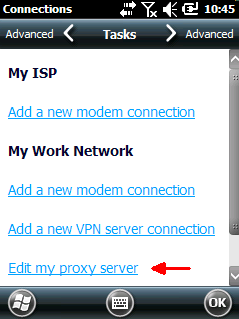
   In the list of text links, if you see
"Set up my proxy server", no change is necessary. If you see "Edit my proxy server", review the article
"Windows Mobile Device Center settings interfere with
mobile device's connection to Wasp service" (linked below)
to decide whether you need to make changes here
(most of the time, the mobile device doesn't need a proxy). |
 |
|
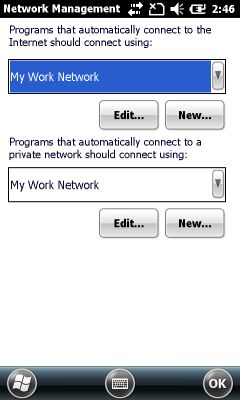
Start, Settings, Connections, Connections, Advanced:
Tap the "Select Networks" button:
|
 |
|
Start, Settings, Connections, Network Cards: 
|
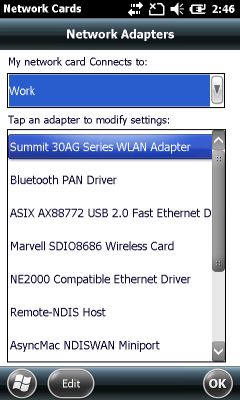 |
In other situations, more trial and error is required to determine the settings that work best with your network. Each of the 3 settings above have 2 settings each, yielding a total of 8 possible combinations. Document the current settings, test, document the results, change to a combination of settings that you haven't used before, repeat.
When you find the combination of settings that works best for you, note that in your documentation. Since the settings get set back to defaults if the mobile device loses all power or is reset, retain this testing documentation for future reference.
In most cases, on the PC, Windows Mobile Device Center needs to have Mobile Device Settings, Connection Settings, "This computer is connected to" set to "Work Network". For detailed instructions on this, see the "settings interfere" article linked below in Related Pages.